Create the video your SaaS deserves.
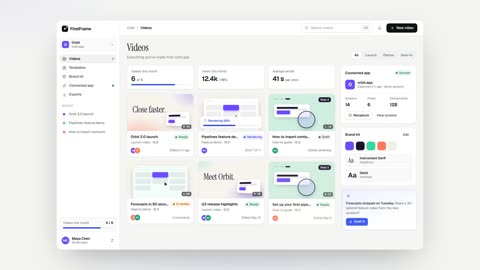
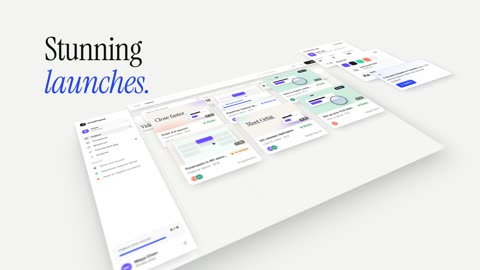
Stunning visuals of your SaaS, perfectly matching the style, components and flow of your interface.
First draft free. No timeline to learn.
Our own launch video, made with FirstFrame from our own interface.
More examples
One interface, every video you need.
Both videos below were made from a real product's interface. Nothing was drawn by hand or generated by AI.
Product launch · 0:28
The product's key moments, filmed with a moving 3D camera: connect, set up, review, go live.
How-to guide · 0:30
A step-by-step tutorial on the real interface: the cursor clicks, the view zooms in, a caption names each step.
How it works
From your app to a video in one conversation.
Let FirstFrame in
Invite our demo bot to your workspace, or share a demo account. It looks around; it never deploys, pays, deletes or emails anyone.
role: read-only viewer
It learns your product
FirstFrame maps your flows, captures every screen as live components, and drafts a script and storyboard from a template made for your kind of video.
brand: fonts, colors, logo
Edit it by chat
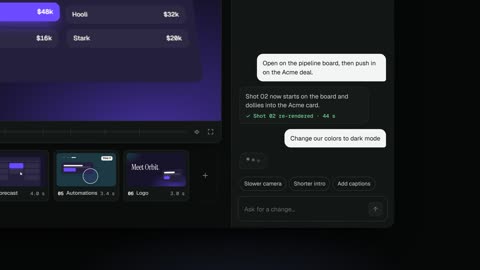
Watch the preview and ask for changes in plain words. Only the shots you change re-render. Export when it's right.
15 s · 30 s · 60 s cuts
Where you direct it
 019.6 s
 028.7 s
 047.6 s
 055.4 s
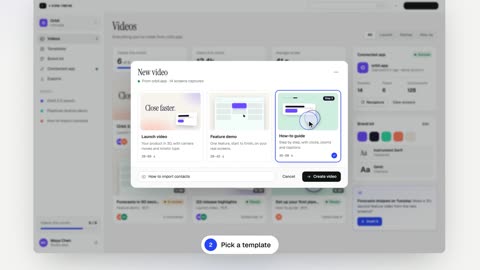 066.6 s
 084.0 s
What you get
Every file your launch needs.
The launch video
A 30 to 60-second video of your product in 1080p at 60 fps or 4K, ready for your site, Product Hunt and YouTube.
Social cuts
15 and 30-second versions in vertical 9:16 and square, cut from the same shots.
Script, voiceover and music
A script written for your product, a natural voiceover and licensed music, mixed and timed to the picture.
Captions and thumbnails
Captions burned in or as an SRT file, plus cover images and clean stills of every screen.
Light and dark versions
Every video in your product's light and dark themes, so it fits wherever you publish it.
Changes and updates
Ask for changes by chat at any time, and re-render the same video when your interface changes.
Edit by chat
Say it. It's changed.
No keyframes, no timeline. Tell FirstFrame what you want the way you'd tell an editor. It knows your product, so "show the billing page" means your billing page.
screen   "Agents"            duration 4.2 s
camera   tilt 16° / -20°      dolly -580 → -420
focus    follows the browser    f/5.6
script   0.25 s  prompt types itself
         2.25 s  click "Copy setup prompt"
         3.00 s  "Claude Code · Connected" appears
Why it looks like your product
Not mockups. Not lookalikes.
Most product videos are screenshots in a device frame, or AI-generated screens that almost look like your app. Buyers notice.
Sharpness
Typical product videoLow-resolution screenshots, blurry when zoomed
FirstFrameLive components rendered at 4K, sharp at any zoom
Accuracy
Typical product videoAI-generated screens that aren't quite your app
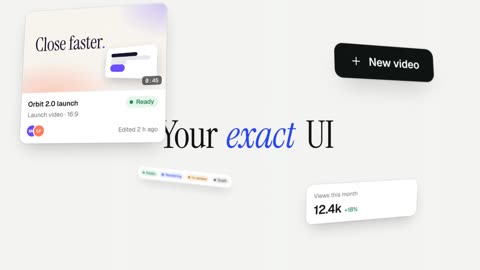
FirstFrameYour exact components, fonts, colors and layout
Editing
Typical product videoRegenerate the whole clip and hope
FirstFramePrecise edits, one shot at a time
Updates
Typical product videoOut of date after your next release
FirstFrameRe-render with the new UI in minutes
Pricing
Make it yourself, or have us make it.
Free draft
- One draft video of your product
- 720p with a watermark
- Chat edits on the draft
Launch
- 2 new videos a month
- 1080p · 60 fps, no watermark
- Voiceover and licensed music
- All formats and cut lengths
Studio
- 8 new videos a month
- 4K exports
- Brand kit and team seats
- A feature video for every release
Done for you
- We script, direct and deliver
- Voiceover, music and every format
- Two rounds of changes
- Delivered in 5 working days
Every plan uses your real UI. Change videos by chat at any time; only the shots you change re-render.
Your product stays yours.
FirstFrame uses a demo account you invite, with read-only access. Personal data on screen is swapped for demo data before anything renders, and you own every video.
Questions
Short answers.
Is this a screen recording?
No. FirstFrame rebuilds your screens as live components, so it can move a camera through them in 3D, change what they show on cue and render them sharp at 4K. A recording can only show what happened once, at the resolution it was captured.
Do you need our source code?
No. FirstFrame works from your running app, through a demo account. Nothing to install and nothing to share from your repository.
How does FirstFrame log in?
Invite our demo bot as a read-only teammate, or give it a demo account. It can explore and click through flows, but it never deploys, pays, deletes or sends anything. Access ends when your video is done unless you keep it for release videos.
Will it really look like our product?
It is your product: the same components, fonts, colors, spacing and copy. The only things FirstFrame adds are camera moves, captions, voiceover and music.
What happens when we change our UI?
Re-render. FirstFrame recaptures the screens and replays the same script, so your video matches the product you ship today.
Can we edit the video ourselves?
Yes, by chat. Ask for any change: wording, timing, which screen appears, camera angle, transitions, music. Only the shots you touch re-render, usually in about a minute.
Does it work for mobile apps?
Today FirstFrame works with anything that runs in a browser, including responsive layouts shown in a phone frame. Native mobile apps are not supported yet.
Get started
Show them the real thing.
Send us your app's URL. Your first draft is free, and you can take it from there by chat or hand it to us.